
Connect your AI assistant to GMB Club (Claude, ChatGPT, Cursor)
Who this is for: you use Claude, ChatGPT, Cursor, Windsurf or Mistral Le Chat, and you want it to be able to read and act on your GMB Club account without leaving your conversation: reply to a review, schedule a post, run an SEO analysis, write an article.
What you'll see: what the connector is for, how to add it to your assistant, the screen where you choose the spheres and the permissions, where to see and revoke the connected assistants, and example requests.
What it is for
GMB Club's MCP connector links your own AI assistant to your account. It is included in every account and gives access to 41 GMB Club tools: Google listings, reviews, social media posts, articles, SEO data, review requests. You ask in plain language, the assistant uses these tools, within the limits of the permissions you granted it.
A few examples:
- "How many reviews did I get this month for Lyon 6e?": the answer arrives in the conversation, without opening GMB Club.
- "Reply to Marie Dupont's review in a warm tone."
- "Schedule this post on Facebook and Instagram for my three stores, Friday at 6 pm."
- "Run an SEO analysis of my website and give me the three priorities for the month."
Connector or Assistant Agent? The Assistant Agent is the conversational agent built into GMB Club, see Assistant Agent. The MCP connector is for running GMB Club from an assistant you already use elsewhere.
Step 1: add GMB Club to your assistant
- In GMB Club, open
Settings › AI connectors(Sphere group). The Connect an AI assistant block gives the server address to copy:https://app.gmb-club.com/mcp/ - Open Claude.ai, ChatGPT or Cursor, and add a custom connector in its settings (the exact menu name depends on the assistant).
- Paste the address and confirm.
- Sign in with your usual GMB Club credentials. The consent screen appears (step 2).
Step 2: choose the spheres and the permissions
The consent screen carries your assistant's name, for example Claude wants to access GMB Club. You choose there what you grant, and you can revoke this access at any time from your settings.
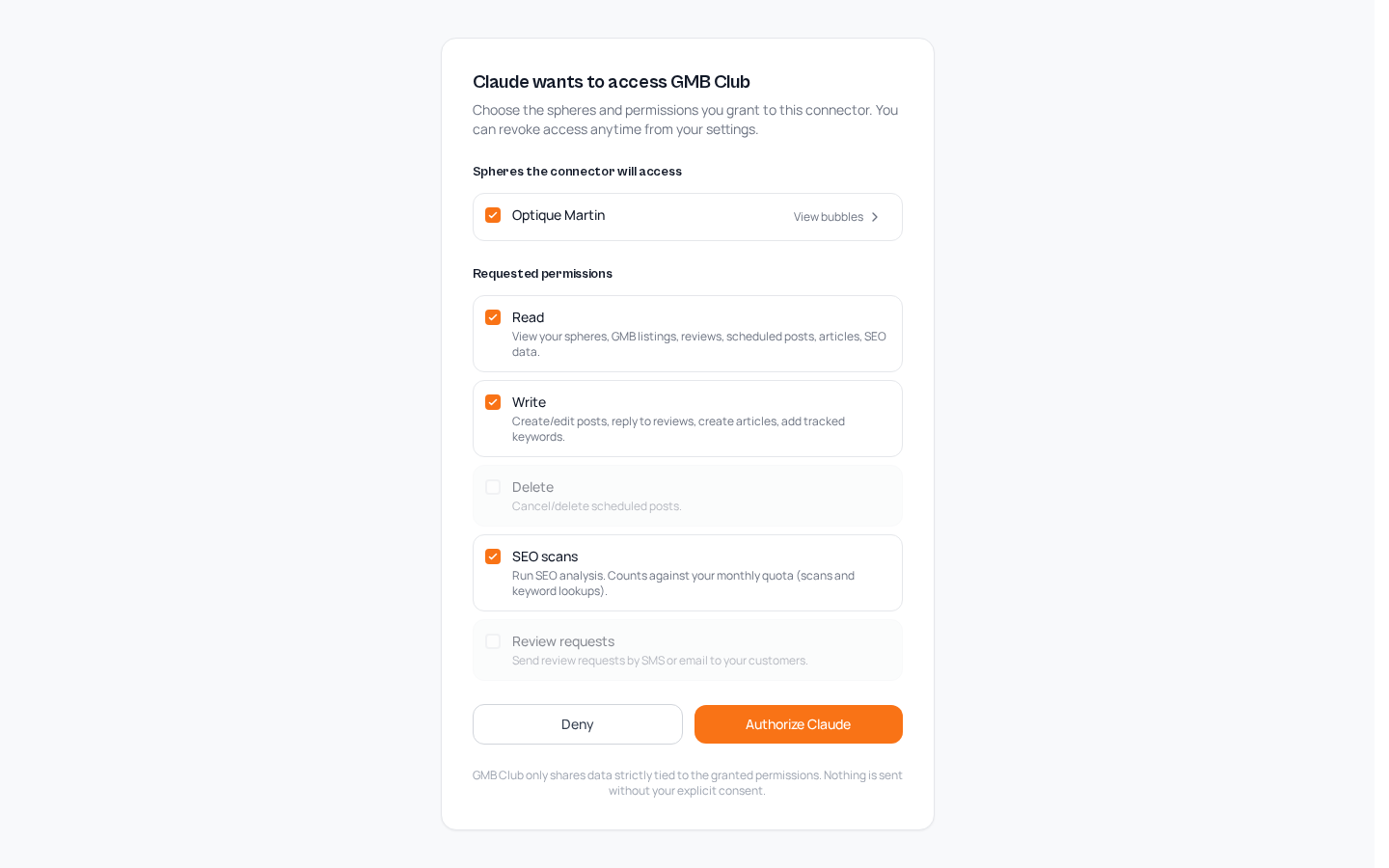
Spheres the connector will access: tick the spheres to share. View bubbles shows the bubbles of each sphere.
Requested permissions: tick or untick each one.
| Permission | What it allows the assistant to do |
|---|---|
| Read | View your spheres, Google listings, reviews, scheduled posts, articles and SEO data. |
| Write | Create and edit posts, reply to reviews, create articles, add tracked keywords. |
| Delete | Cancel or delete scheduled posts. |
| SEO scans | Run SEO analyses. They count against your monthly quota (scans and keyword lookups), see Bubbles, sharing and subscription. |
| Review requests | Send review requests by SMS or email to your customers. |
Click Authorize (the button carries the assistant's name, for example Authorize Claude), or Deny.
Advice: only grant what you need. For an assistant that should only give you figures, Read is enough. Delete and Review requests can stay unticked as long as you don't use them.
See and revoke the connected assistants
Open Settings › AI connectors. Like every category in the Sphere group, these settings apply to the whole sphere, for each of its bubbles.
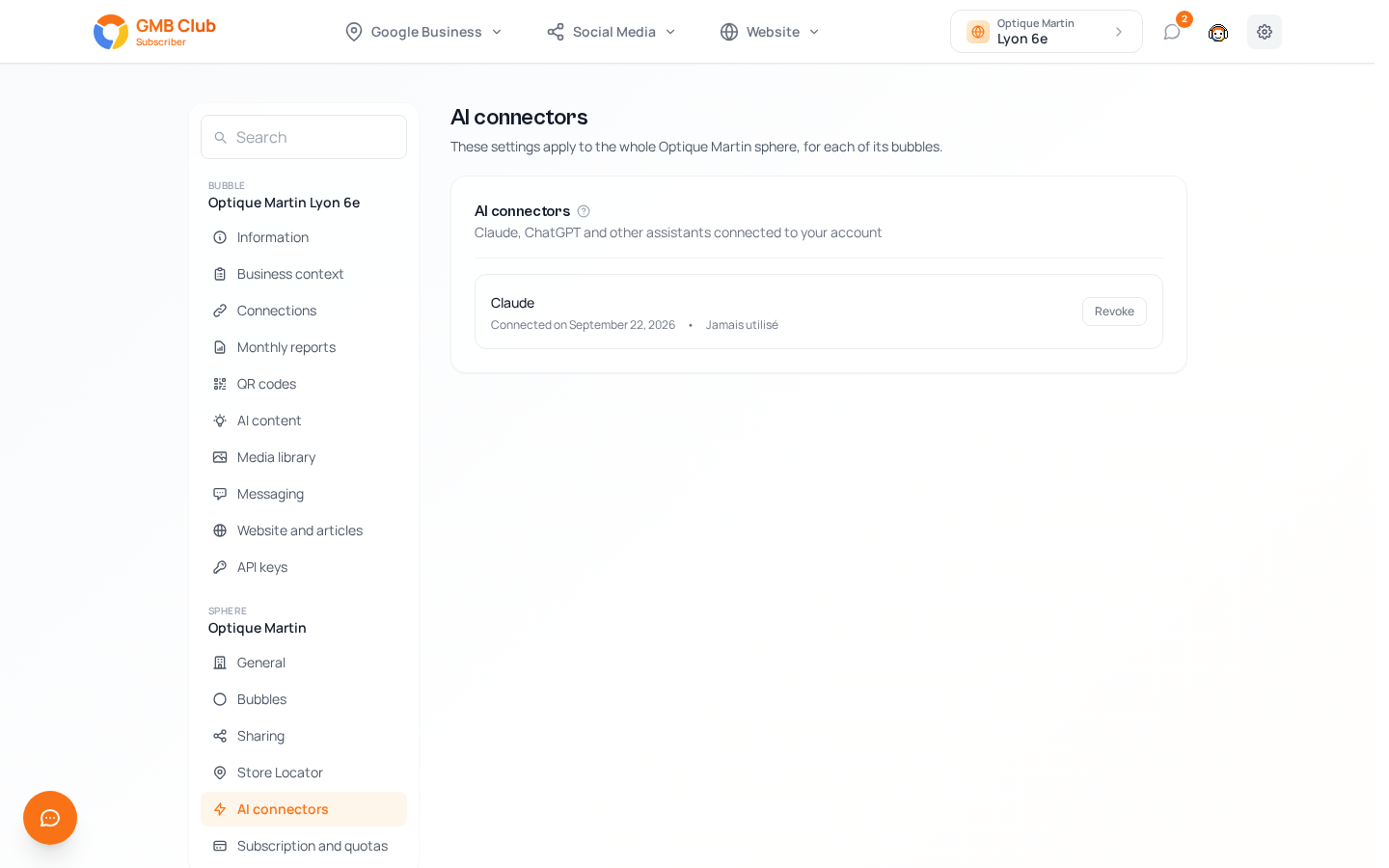
The AI connectors block lists "Claude, ChatGPT and other assistants connected to your account". For each assistant, you see its name, its connection date and its usage (here, it has never been used).
The Revoke button cuts this assistant's access. To change the spheres or the permissions granted, revoke the assistant and then connect it again: you go back through the consent screen.
Your guarantees
The assistant only accesses the spheres you ticked on the consent screen.
Read, write, delete, SEO analyses and sending review requests are granted separately.
GMB Club only shares data strictly tied to the granted permissions. Nothing is sent without your explicit consent.
Each connected assistant appears in Settings › AI connectors, with its connection date and a Revoke button.
Example requests
What you can ask depends on the permissions granted.
| Permission | Example request |
|---|---|
| Read | "Which posts are scheduled next week for Villeurbanne?" |
| Read | "What is my position on "optician lyon 6"?" |
| Write | "Reply to the last three 5-star reviews in a warm tone, signed Camille and her team." |
| Write | "Schedule this post on Facebook and Instagram for my three stores on Friday at 6 pm, adapting the neighborhood name in the text." |
| Write | "Write a blog article on choosing your first contact lenses, in an expert tone." |
| Delete | "Cancel the post planned for tomorrow at noon." |
| SEO scans | "Run an SEO analysis of my website and give me the three priorities for the month." |
| Review requests | "Send a review request by SMS to my customer Marie Dupont, 06 12 34 56 78." |
For an agency managing several clients, each client is a sphere: tick the spheres concerned on the consent screen, then ask for example "give me an SEO update for each of my clients, with three priorities per client".
Need help setting up your connector?
Write to us at [email protected], we'll guide you step by step. For frequently asked questions (security, revocation, agencies, quotas…), also see our AI Connector FAQ.