
Google Business Profile Without an Address: Service-Area, Storefront or Hybrid (2026)
In short. Google knows only three ways to present a business: with a visible address, with a service area and the address hidden, or both (a "hybrid" business). The official rule fits in one sentence: "If you don't serve customers at your business address, remove your address from your Business Profile." A service area holds up to 20 cities or postal codes, never a radius, and should stay within about 2 hours of driving. Everything else on the profile depends on the category: menus and ordering for a restaurant, a booking button for a salon, room prices for a hotel. In our observatory of 800 top-ranked profiles, 70% of opticians show an appointment link, against 0% of bakeries.
Updated November 2, 2026 by Alexandre Damais, co-founder of GMB Club.
This guide is for owners setting up a Google Business Profile, or wondering whether theirs is set up right: a plumber who doesn't want to publish a home address, a pizzeria that delivers, a hotel that can't find the "offer" button. Every rule quoted here comes from Google's own help pages, read on November 2, 2026. To see in two minutes what Google currently shows about your business, run our free Google Business Profile audit, which scores the profile out of 100.
The three Google Business Profile types
Google sorts every profile with one question: do customers come to your address, do you go to them, or both? Its help page on service areas defines two cases by name, and the third follows.
| Profile type | Address shown | Service area | Examples |
|---|---|---|---|
| Storefront | Yes | No | Bakery, optician, gym, clinic |
| Service-area business | No, hidden | Yes, up to 20 areas | Plumber, electrician, cleaning, mobile photographer |
| Hybrid business | Yes | Yes | Restaurant that delivers, garage with roadside assistance |
Google's definitions, word for word. Service-area business: "A business that visits or delivers to customers directly but doesn't serve customers at their business address." Hybrid business: "A business that serves customers at its business address but also directly visits or delivers to them." Google adds the condition that decides between the two: "If your business doesn't have permanent on-site signage, it's not eligible as a storefront and should be listed as a service-area business."
Hiding your address: Google's rule
Hiding the address is not a privacy setting you may skip. It is required when nobody comes to you. Google's guidelines say it plainly: "If you're a service-area business, you should hide your business address from customers. For example, if you're a plumber and run your business out of your residence, remove your address from your Business Profile."
Two details prevent most suspensions:
- One profile for the whole area. "Service-area businesses can only have one profile for the whole area they serve." Creating one profile per nearby town is the classic mistake.
- No online-only businesses. Google's eligibility rules state that "a business must make in-person contact with customers during its stated hours," and exclude "brands, organizations, artists, and other online-only businesses."
Setting your service area: 20 areas, no radius
The service area replaces the address on the map. You set it in the profile editor under "Service area," within three official limits:
- Up to 20 areas. "You can have up to 20 service areas," based on "the cities, postal codes, or other areas you serve."
- No radius. "You can't set your service area as a radius distance around your business. If you previously set up your service area this way, you can't edit it." Redefine it by city or postal code.
- About 2 hours of driving, with exceptions. The guidelines ask that the area "shouldn't extend farther than about 2 hours of driving time from where your business is based," and add: "For some businesses, larger service areas may be appropriate."
Approved changes can take up to 48 hours to show. Our field advice: list the towns where you actually work every week, not the ones where you would like to be seen. An inflated area blurs the one thing the customer wants to know: will you come to them?
What your category unlocks
The profile type decides the address. The category decides the buttons. Google's category page says: "Based on your business category, you might notice special features available for your Business Profile." You get one required primary category and "up to 9 additional categories," always from Google's list: "You can't create your own category." To find the exact label, search our free Google Business Profile categories tool, and read our guide on choosing the right category.
Restaurants, bars and cafés
Google's first example: restaurants "can add links for online orders, reservations, and menus," and "can also add menu items directly." The menu editor, with dishes, descriptions and prices, is reserved for food and drink businesses (menu help). Ordering and booking go through your own link or through third-party providers (links help).
Health, beauty and appointment-based services
For health and beauty businesses, Google lists a booking button and an updatable list of services. The button connects either to a Reserve with Google partner, which "will show up on your Business Profile within a week," or to your own link: "You can also add your own link to your Business Profile" (bookings help). Services can carry a description and a price.
Hotels and lodging
Hotel profiles have their own format. "The hotel prices and booking links on your hotel's profile come from Google Hotel Ads and free booking links" (hotel help). Opening hours can't be edited, since hotels are treated as open 24 hours. The 1 to 5 star hotel class follows the official local rating where one exists, and Google assigns it: to dispute it, you contact Google (hotel class help). Contrary to a common claim, hotels do publish posts: "Hotel businesses can create local posts," but "Hotels can't create 'offer' posts, or any post that mentions or includes links to deals, promotions, special offers, or discounts" (posts policy).
Museums, landmarks and attractions
Attractions and tour operators can list tickets and activities, with two required fields, the ticket or activity name and the booking URL. Google's connectivity partners show up before your own listing (tickets help).
Four myths about profile formats
| Myth | What Google says |
|---|---|
| "Hotels can't post on Google." | False. They post, except offers and promotions. |
| "Popular times are a museum feature." | False. They show for any place with enough visits, from anonymized data, and "You can't manually add this information to your location" (help). |
| "The service area is strictly capped at 2 hours." | It is the default rule, but "larger service areas may be appropriate." The hard cap is 20 areas. |
| "Only the primary category unlocks features." | Google says "your business category," without specifying which. Choose the primary carefully, and don't neglect the others. |
What 800 profiles from our observatory show
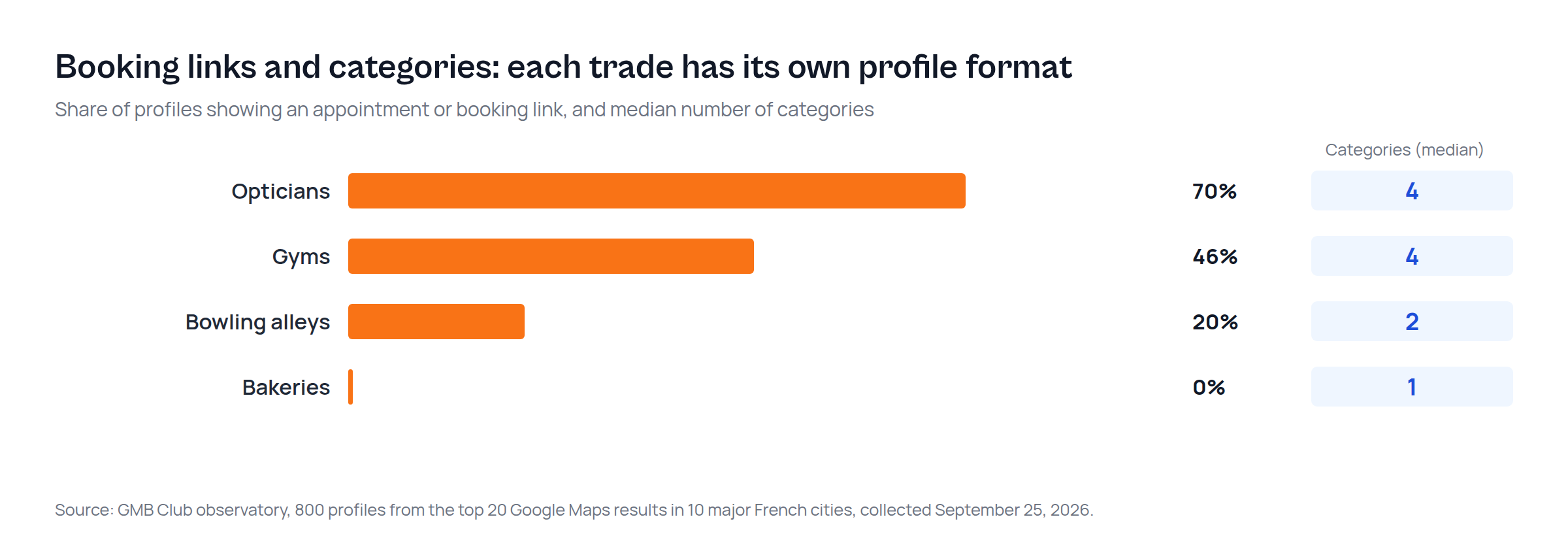
We looked at what the best-ranked businesses actually do with these features. Method: the top 20 Google Maps results in 10 large French cities, for four trades, 800 profiles collected on September 25, 2026.
| Trade | Profiles with an appointment or booking link | Median categories | Profiles with a single category |
|---|---|---|---|
| Opticians | 70% | 4 | 16% |
| Gyms | 46% | 4 | 24% |
| Bowling alleys | 20% | 2 | 40% |
| Bakeries | 0% | 1 | 66% |
Three takeaways. First, the format follows the trade: where customers book, most top profiles show the button, and an optician without an appointment link is in the minority. Second, appointment-based trades use more additional categories (a median of 4), while two bakeries out of three declare only one. Third, none of the 800 profiles hides its address: in trades where customers walk in, the question doesn't arise, and the storefront type is the norm.
Limits of this data
These figures describe what first-page profiles do, not what got them there: a snapshot, not proof of cause and effect. They cover four trades in large French cities; mobile tradespeople, hotels and restaurants are not in this sample. The appointment link we recorded may be a Google booking link or a link to the business website, without distinction. And Google changes category features without notice: check its help page before concluding that a button doesn't exist for your trade.
Keeping the profile right over time
Picking the right type and category is done once. Keeping the profile accurate, with correct hours, regular posts, answered reviews and working links, happens every week. That is what GMB Club does. GMB Club is the all-in-one marketing platform for local businesses: it analyzes your profile, compares it with the businesses around you, suggests corrections and applies them, replies to your reviews and schedules your posts on Google and social media. See pricing to try it for up to one week free, with no commitment, or book a 15-minute call.
Guide written by Alexandre Damais, co-founder of GMB Club. Google quotes come from its English help pages read on November 2, 2026.
Frequently asked questions
Can I have a Google Business Profile without an address?
Yes, if customers don't come to you. You hide the address and list up to 20 service areas. Google actually requires it: "If you don't serve customers at your business address, remove your address from your Business Profile."
Should a hybrid business hide its address?
No. It keeps the address visible because it serves customers there, and adds a service area for deliveries or visits.
How many categories can a Google Business Profile have?
One primary category and up to 9 additional ones, picked from Google's list: "You can add up to 9 additional categories that represent your business."
Can a hotel publish posts on its Google Business Profile?
Yes. "Hotel businesses can create local posts." What hotels can't do is publish offer posts or any post mentioning deals, promotions or discounts.
Can an online-only store get a Google Business Profile?
No. "To qualify for a Business Profile, a business must make in-person contact with customers during its stated hours."
Sources
- Google, Manage your service area for service-area & hybrid businesses
- Google, Guidelines for representing your business on Google
- Google, Manage your business category
- Google, Business Profile eligibility guidelines
- Google, Posts content policy (hotel posts)
- Google, Hotel Business Profiles
- Google, Popular times, wait times and visit duration