

How to Check Your Position on Google: 3 Free Methods (2026)
In short. You have two positions on Google: your website in the regular results, and your business in the map results. For the website, the free and reliable answer is Google Search Console, whose "average position" is the topmost position of your page, "averaged across all queries in which your property appeared." For the map, run the same search from several points around your address, which our free Google Maps rank checker does at 25 points. Searching for yourself only gives one sample: Google says results are "specific to the time, place, device, and recent history of the person searching." Our test on one of our own pages shows why one number is never enough: 476 queries in 28 days, with average positions ranging from 1 to 92.5.
Updated November 25, 2026 by Adam Abdelmoumen, co-founder of GMB Club.
"What is my position on Google?" sounds like a question with one answer. It has at least two, and each has its own free tool. If you run a local business, the position that brings walk-in customers is usually the one on the map: check it with our Google Maps rank checker, which shows your rank street by street, without signing up. If you want to know where your website ranks in the regular results, Google Search Console is the tool. This guide explains both, plus how to do a manual check that doesn't lie to you, with Google's definitions quoted word for word from its help pages, read on November 19, 2026.
Two positions on Google: web results and the map
When someone searches "dentist near me" or "bakery Brooklyn," Google can show your business in two places on the same page: the map results, fed by your Google Business Profile, and the regular web results, which link to your website. They are ranked by different rules and measured with different tools.
| Web results (your website) | Map results (your Business Profile) | |
|---|---|---|
| What is ranked | A page of your site | Your Google Business Profile |
| What Google says it uses | "your location and settings" among many signals | "relevance, distance, and popularity" |
| Free official data | Search Console: average position per query | Business Profile performance: the search terms that found you, no position |
| Free position check | Search Console | A grid rank checker |
For the map, Google's page Tips to improve your local ranking says: "Local results are mainly based on relevance, distance, and popularity." Distance is the key one for your check: "Distance refers to how far each business is from the customer who's searching." That is why a map position only makes sense with a location attached to it.
Method 1: Google Search Console, the real average
Google describes Search Console as "a free service offered by Google that helps you monitor, maintain, and troubleshoot your site's presence in Google Search results." It is the only source that shows your position as Google records it, across all the people who saw your site, not just you.
- Add your website as a property and verify that you own it (Search Console walks you through the options).
- Open the Performance report for Search results. By default it covers the past three months.
- Turn on the "Average position" metric: you choose metrics "by toggling the appropriate heading above the chart."
- Open the Queries tab to see the position for each search term, or the Pages tab for each page.
- Filter on a query, a page, a country or a device to answer a precise question, such as "what is my position for this keyword on mobile in the US?"
Two details avoid wrong conclusions. "Position is calculated only for Google Search Results," so the map pack is not measured here. And "A link must get an impression for its position to be recorded": if nobody scrolled to page 3, there is no position for page 3.
What "average position" really means
Google defines it precisely on its page What are impressions, position, and clicks?: "The position value shown in the Performance report is the topmost position occupied by a link to your property or page in search results, averaged across all queries in which your property appeared."
Google's own example: one query shows your site at positions 2, 4 and 6, which counts as 2; another at 3, 5 and 9, which counts as 3. "The average position across these two queries is (2 + 3)/2 = 2.5."
Three consequences:
- Elements count as one position. "An AI Overview occupies a single position in search results, and all links in the AI Overview are assigned that same position." A carousel works the same way.
- Ads don't count. "Note that ads do not occupy a search position." Being "first" under four ads is still position 1.
- Position 11 is not always page 2. Google warns that "a position number can mean different things in different situations," and gives as an example "the top right side position in a knowledge panel" on desktop.
Google's advice for reading it: "We recommend that you monitor change in position over time, particularly sudden position changes, as well as absolute position."
Method 2: a manual search that doesn't lie to you
Typing your keyword into Google is the fastest check and the least reliable one. Google's How Search works page explains why: "we use information such as your location, past Search history, and Search settings to determine what is most relevant for you in the moment." Search Console's help answers the classic complaint directly: "For your specific search your position might be different than the average because of many variables, such as your search history, location, and so on."
If you still want to look with your own eyes, reduce the bias:
- Use a private browser window, signed out of your Google account, so your history doesn't weigh in.
- Search from where your customers are, not from your shop. For a local business, your own address is the best possible case.
- Count only organic results: skip ads, and count a block (map, AI Overview, video carousel) as one position, as Search Console does.
- Use Google's "About this result" panel: Google says it lets you "easily see if your search history or other personal data was a factor in ranking a given result for that query."
- Write the result down with the date, device and place. One check is an anecdote; the same check every month is a trend.
Method 3: your position on Google Maps
The map is where Search Console stops. Your Business Profile has its own statistics: Google's performance page lists "Searches: The search terms people used to find your business," but no position. Note also that "Performance data is available only for verified Business Profiles," and that the searches metric "is updated at the start of each month."
To see your map position, the search has to run from several locations, because distance is a ranking factor. Our free Google Maps rank checker lays a 5 by 5 grid of points, 1.2 km apart, around your address and records your rank at each one, then shows the businesses ranking ahead of you at the center. The full method for reading a grid, and what moves a map position, is in our guide to checking your Google Maps ranking.
One timing rule from Google applies to new profiles: "Rankings for new businesses can take up to a month to appear in search results."
Our test: one page, 476 queries
To show why "my position" is never one number, we exported our own Search Console data for one English page of this site, our guide to Instagram story sizes, over 28 days ending November 17, 2026. Method: we grouped the 476 query rows by their average position and counted the impressions in each group.
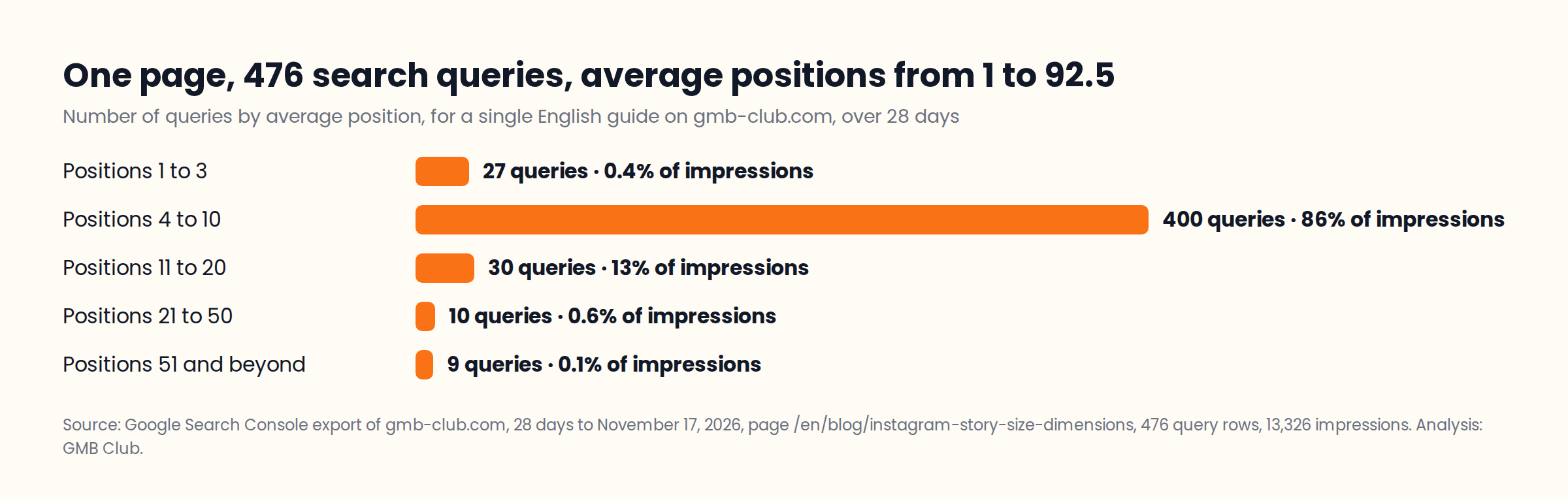
| Average position of the query | Queries | Share of the page's 13,326 impressions |
|---|---|---|
| 1 to 3 | 27 | 0.4% |
| 4 to 10 | 400 | 86% |
| 11 to 20 | 30 | 13% |
| 21 to 50 | 10 | 0.6% |
| 51 and beyond | 9 | 0.1% |
The same page ranked 5.8 on average for its main query, 17.3 for a close variant written with an abbreviation, and 32.6 for a version with the year added. Weighted by impressions, the query rows average 8.0. So the honest answer to "what is my position?" is a distribution: which queries, in which range, with how many impressions. Search Console gives it for free.
Reading your numbers: what to do next
Once you have positions per query, sort them into three groups, each with its own action:
| Where the query ranks | What it usually means | Next step |
|---|---|---|
| 1 to 3 | You already answer the search well | Protect it: keep the page accurate and up to date |
| 4 to 20 | Google sees you as relevant, others answer better | Improve that page for that exact question: title, first paragraph, missing details |
| Beyond 20 | The page is not really about that query | Ignore it, or write a page that is |
For map positions, the levers are different and mostly sit in your Business Profile: category, completeness, reviews. Our guide on how to rank higher on Google Maps and the field-by-field Google Business Profile audit checklist cover them.
Tracking positions over time
A single check, even a good one, tells you where you are, not where you are going. Google itself recommends watching changes over time. For the web, Search Console keeps the history for you. For the map, the grid has to be run again with the same keywords and the same points, or you compare two different things.
GMB Club is the all-in-one marketing platform for local businesses: its SEO tracking follows your keyword positions on Google location by location, brings in your real traffic from Search Console and adds Core Web Vitals and a technical audit, in one report you can export to PDF. For the map, the full 49-point visibility scan compares your area with your competitors. See pricing.
Limits of this guide
Our test covers one page of one site over 28 days; another site, another topic or another period will show another distribution. Search Console leaves some rare queries out of its tables ("Some queries are omitted from the report to protect user privacy," per Google's page on data groupings), so the rows we analyzed don't cover every impression the page received. Our weighted average of query rows is our own calculation, not a figure displayed by Search Console. Google's definitions come from its English help pages read on November 19, 2026, and Google notes that its position "heuristics" are "subject to change."
Guide written by Adam Abdelmoumen, co-founder of GMB Club. Sources checked on November 19, 2026.
Frequently asked questions
How can I check my position on Google for free?
For your website, use Google Search Console: its Performance report shows the average position for each search query, for free. For your business on Google Maps, use a grid rank checker such as our free Google Maps rank checker, which tests your position from 25 points around your address.
Why is my position different when I search myself?
Because Google adapts results to the person searching. Search Console's help says results are "specific to the time, place, device, and recent history of the person searching." Your own search is one sample, not your average.
What does average position mean in Search Console?
It is "the topmost position occupied by a link to your property or page in search results, averaged across all queries in which your property appeared." A position is only recorded when your result gets an impression.
Is a position of 11 on page 2?
Not always. Google warns that a position number "can mean different things in different situations." On desktop, position 11 could be the top of the right-hand side, for example a knowledge panel.
How long before a new business shows up in Google results?
Google says "Rankings for new businesses can take up to a month to appear in search results," and that edits to your business info "can take up to 3 days to appear."
Sources
- Google, About Search Console
- Google, Performance report (Search results): Overview and basic setup
- Google, What are impressions, position, and clicks?
- Google, How Search works: ranking results
- Google, Tips to improve your local ranking on Google
- Google, Performance report (Search results): Dimensions and data groupings
- Google, Understand your Business Profile performance and insights