
Automate GMB Club with n8n or Make
Who this is for: you want some GMB Club actions to be triggered at the right moment from your other tools: schedule the posts you prepared in a spreadsheet, send a review request after every appointment, receive the list of unanswered reviews every morning. No coding needed.
What you'll see: what n8n and Make bring, how to create your API key in Settings › API keys, how to plug it into n8n or Make, and example scenarios.
n8n and Make in a nutshell
n8n and Make are tools that connect your apps to each other. You describe a simple scenario to them, along the lines of "when this happens, do that", and they run it every time the condition is met.
In our case:
- GMB Club brings the actions: schedule or publish a post, read your reviews and reply to them, create an article, send a review request, fetch your listing's statistics.
- n8n or Make brings the trigger (a time, a form filled in, a row added to a spreadsheet, an appointment completed…) and the link with your other tools (calendar, CRM, Google Sheets, mailbox).
You don't write code: you assemble blocks, visually.
To run GMB Club in a conversation from Claude or ChatGPT, that is another way in: see AI connectors.
Step 1: create your API key in GMB Club
The API key is the password your scenario shows to GMB Club. It is created in the Settings.
- Click the gear icon at the top right of the header to open the Settings.
- In the left-hand menu, under Bubble, click API keys. You see the list of your keys there, with for each one its beginning, its permissions and its usage.
- Click New key.
URL: /dashboard/parametres/cles-api
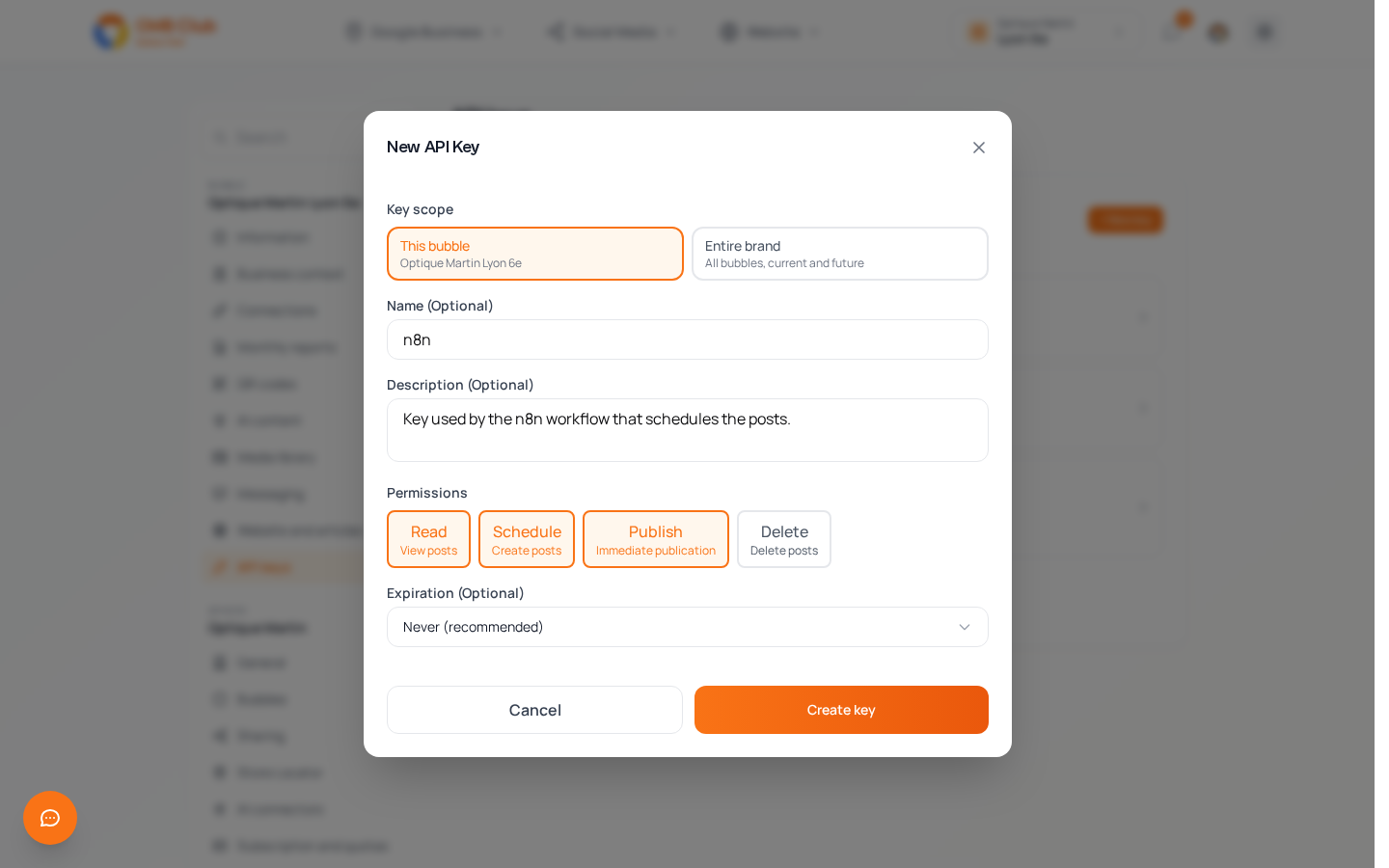
The New API Key window opens:
| Field | What it is for |
|---|---|
| Key scope | This bubble: the key only acts on the selected bubble. Entire brand: it acts on "All bubbles, current and future" of the sphere. |
| Name (Optional) | A name to recognize it, for example n8n. |
| Description (Optional) | What it is used for, for example "Key used by the n8n workflow that schedules the posts." |
| Permissions | What the key is allowed to do: Read (view posts), Schedule (create posts), Publish (immediate publication), Delete (delete posts). Click a box to select or deselect it. |
| Expiration (Optional) | The date on which the key stops working. The app recommends Never (recommended). |
Click Create key.
GMB Club then shows API Key created! with your full key. Click Copy my key and keep it somewhere safe: it is only shown once, when it is created. If you lose it, create a new one.
Step 2: plug the key into n8n
GMB Club has its own n8n node, published under the name n8n-nodes-gmb-club.
- Install the node. On an n8n you host yourself: Settings › Community Nodes › Install, then enter
n8n-nodes-gmb-club. - Create the credential. In n8n, create a GMB Club API credential and paste your key into it.
- Build your scenario. Choose a trigger, then add the GMB Club node and the action you want.
- Test, then activate. Run the scenario once by hand to check the result in GMB Club, then activate it.
The node covers the common actions: posts (create, edit, publish, delete), reviews (list, summarize, reply), articles (create, edit, publish), images, Google listing statistics and review requests. For an action it doesn't offer, n8n's HTTP Request node can call GMB Club with the same GMB Club API credential.
Step 2 (alternative): plug the key into Make
On Make, the same key is used to call GMB Club. The steps to follow (module to use, request format) are detailed in the API documentation, in the Make · n8n · Zapier section.
Three concrete examples
1. The posts you prepared, scheduled on the right date. Trigger: a new row in your Google Sheets, with the text, the image and the chosen date. Action: GMB Club schedules the post on that date. You prepare your month in a spreadsheet, the scenario does the data entry for you.
2. A review request after every appointment. Trigger: a customer marked "appointment completed" in your calendar or your CRM. Action: GMB Club sends them a review request by SMS or by email.
3. The morning update on your reviews. Trigger: every morning at 8 am. Action: GMB Club fetches the unanswered reviews, and the scenario sends them to you by email. You reply from the Review Management page, or you let the Reviews Agent handle it (see Reviews).
Best practices
- One key per scenario. Give it a clear Name and Description: you will always know which key is used for what.
- As few permissions as possible. A scenario that only reads only needs Read. Only tick Publish and Delete if the scenario really needs them.
- The right scope. This bubble is enough for a single point of sale. Entire brand saves you from creating one key per location when the same scenario serves the whole network.
- Start simple. A single useful scenario is worth more than ten complicated ones. You will add others later.
- Test before activating. Run the scenario by hand and check the result in GMB Club before activating it.
- Keep a human check on sensitive reviews. A reply sent by your scenario goes straight to Google: for negative reviews, reply from the Review Management page instead.
What you need
A GMB Club account, a key created in Settings › API keys, and an n8n or Make account.
Need a hand?
If you want to automate a specific scenario and don't know where to start, write to us: we'll help you build it.